15
RGB vs HEX Colors: Understanding Color Codes for Websites and Digital Design
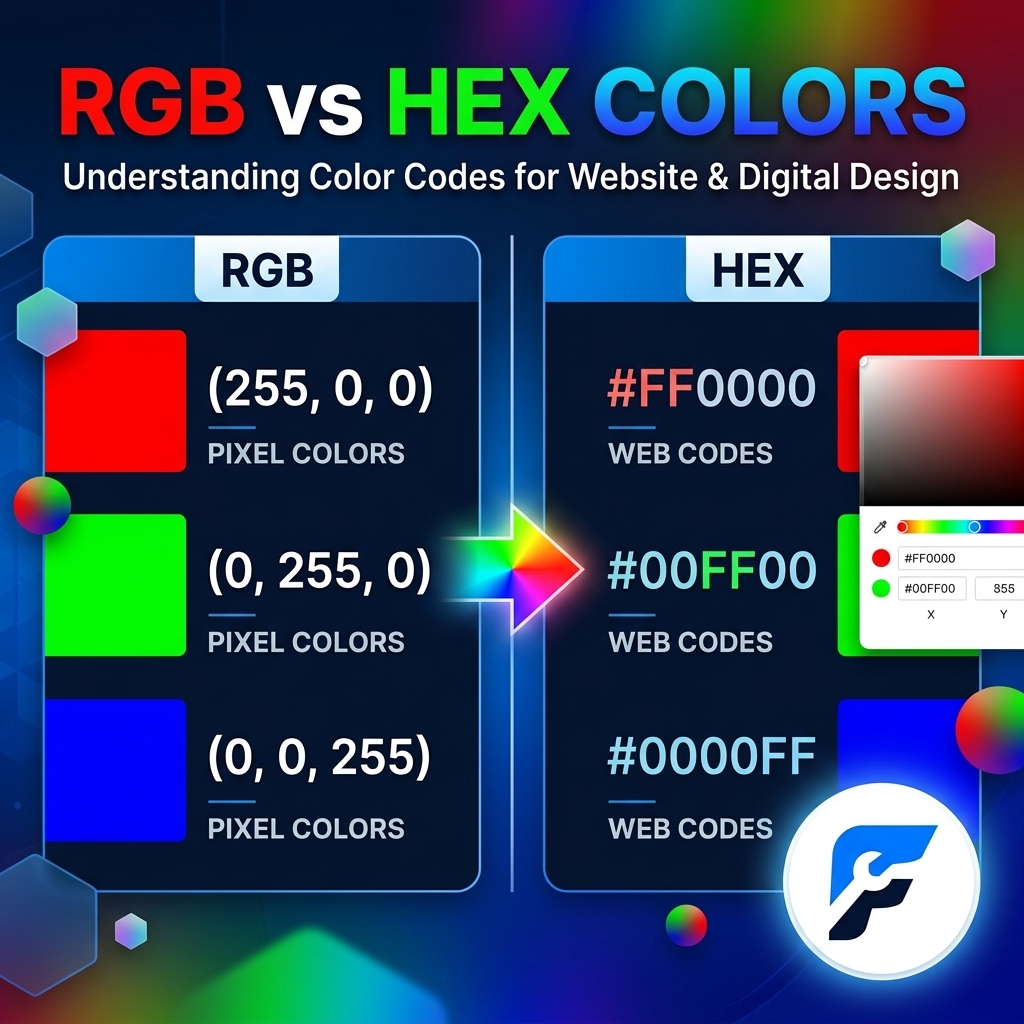
RGB vs HEX Colors
Choosing the right color format is an important part of creating a website, app, graphic, or digital design. If you have ever worked with CSS, HTML, graphic design software, or website builders, you have probably come across color codes such as #FF0000 or rgb(255, 0, 0).
These two formats represent colors in different ways, but they can often describe exactly the same color. The most common formats used in digital design are RGB and HEX.
So, what is the difference between RGB and HEX colors? When should you use one instead of the other? And how do you convert RGB to HEX or HEX to RGB?
This guide explains everything you need to know about RGB vs HEX colors, including how each format works, their advantages and disadvantages, examples, conversions, CSS usage, and practical tips for choosing the right color code for your project.
What Is RGB?
RGB stands for Red, Green, and Blue. It is a color model that creates colors by combining different amounts of red, green, and blue light.
RGB is based on the additive color system used by digital screens. Your computer monitor, smartphone, television, and other displays create colors by combining these three primary light components.
A standard RGB color is written like this:
rgb(255, 0, 0)
The three numbers represent:
- Red: 255
- Green: 0
- Blue: 0
Because red is at its maximum value while green and blue are set to zero, this produces pure red.
Each RGB value traditionally ranges from 0 to 255.
For example:
rgb(0, 0, 0)
represents black.
rgb(255, 255, 255)
represents white.
rgb(0, 255, 0)
represents green.
rgb(0, 0, 255)
represents blue.
By combining different values of red, green, and blue, millions of different colors can be produced.
How Does RGB Work?
RGB uses three channels:
- Red
- Green
- Blue
Each channel can have a value from 0 to 255. This means there are 256 possible values for each channel.
The total number of possible combinations in standard 24-bit RGB is:
256 × 256 × 256 = 16,777,216 colors
This is why RGB is capable of representing millions of colors on digital displays.
For example:
rgb(255, 100, 50)
contains a high amount of red, a moderate amount of green, and a smaller amount of blue.
Changing any of the three numbers changes the resulting color.
What Is HEX?
HEX stands for hexadecimal. A HEX color code is another way of representing RGB color values.
HEX codes are commonly used in HTML and CSS because they are compact and easy to store.
A typical HEX color looks like this:
#FF0000
The # symbol indicates that the value is a hexadecimal color code.
The six characters after the # represent red, green, and blue values:
#RRGGBB
The first two characters represent red.
The middle two represent green.
The final two represent blue.
For example:
#FF0000
means:
- FF = red
- 00 = green
- 00 = blue
Therefore, #FF0000 is pure red.
How Does HEX Color Coding Work?
HEX uses the hexadecimal number system, which is based on 16 symbols:
0 1 2 3 4 5 6 7 8 9 A B C D E F
The letters represent values greater than 9:
- A = 10
- B = 11
- C = 12
- D = 13
- E = 14
- F = 15
Each pair of HEX characters represents one RGB channel.
For example:
#3366CC
can be divided into:
33 66 CC
These correspond to:
- 33 = red
- 66 = green
- CC = blue
Each pair can represent a value from 00 to FF, which corresponds to 0 through 255 in decimal.
RGB vs HEX: What Is the Difference?
The biggest difference between RGB and HEX is how the color information is written, not necessarily the color itself.
RGB uses decimal numbers:
rgb(51, 102, 204)
HEX uses hexadecimal numbers:
#3366CC
Both represent the same color.
The difference is mainly the notation and the situations in which each format is convenient.
FeatureRGBHEX
Full name | Red, Green, Blue | Hexadecimal
Format | rgb(255, 0, 0) | #FF0000
Number system | Decimal | Hexadecimal
Channels | Red, Green, Blue | Red, Green, Blue
Common use | CSS, design, image editing | HTML, CSS, design
Readability | Easy to understand channel values | Compact
Transparency support | Supported with RGBA | Supported with 8-digit HEX
Color representation | RGB-based | RGB-based
The important point is that HEX is essentially another way of expressing RGB values.
RGB and HEX Can Represent the Same Color
One of the most useful things to understand is that RGB and HEX are not competing color models.
For example:
RGB: rgb(255, 0, 0)
HEX: #FF0000
Both represent pure red.
Another example:
RGB: rgb(0, 128, 0)
HEX: #008000
Both represent the same green.
And:
RGB: rgb(255, 255, 255)
HEX: #FFFFFF
Both represent white.
The format changes, but the underlying RGB color values remain the same.
RGB vs HEX in CSS
Both RGB and HEX can be used directly in CSS.
For example, you can set a website background using HEX:
body {
    background-color: #F5F5F5;
}
You can create the same type of rule using RGB:
body {
    background-color: rgb(245, 245, 245);
}
There is no inherent requirement that one format must always be used.
Your choice usually depends on readability, project conventions, transparency requirements, and personal preference.
Using HEX Colors in CSS
HEX is extremely common in CSS.
For example:
.button {
    background-color: #007BFF;
    color: #FFFFFF;
}
Here, #007BFF sets the button's background color, while #FFFFFF makes the text white.
HEX colors can also use a shortened three-character format when appropriate.
For example:
#FFF
is equivalent to:
#FFFFFF
Likewise:
#000
is equivalent to:
#000000
The shorthand works by duplicating each character.
For example:
#ABC
becomes:
#AABBCC
Using RGB Colors in CSS
RGB can also be used in CSS.
For example:
.button {
    background-color: rgb(0, 123, 255);
    color: rgb(255, 255, 255);
}
One major advantage of modern RGB syntax is that you can also control transparency using an alpha value.
For example:
background-color: rgb(0 123 255 / 50%);
This creates a blue color with 50% opacity.
Older CSS syntax commonly uses rgba():
background-color: rgba(0, 123, 255, 0.5);
Both approaches are useful, although modern CSS supports a wider range of color syntax than older versions.
What Is RGBA?
RGBA stands for:
- Red
- Green
- Blue
- Alpha
The alpha component controls transparency.
For example:
background-color: rgba(255, 0, 0, 0.5);
This creates red with 50% opacity.
The alpha value traditionally ranges from:
0 = completely transparent
1 = completely opaque
So:
rgba(255, 0, 0, 1)
is fully opaque red, while:
rgba(255, 0, 0, 0)
is completely transparent.
Can HEX Colors Support Transparency?
Yes. Modern CSS also supports an eight-digit HEX format.
The standard six-digit format is:
#RRGGBB
The eight-digit format is:
#RRGGBBAA
The final two characters represent the alpha channel.
For example:
#FF000080
represents red with approximately 50% opacity.
This gives HEX a convenient way to represent both color and transparency in a single value.
RGB vs HEX for Web Design
Both formats are suitable for website design.
However, HEX is particularly popular in web development because it is compact and widely recognized in HTML and CSS.
For example:
:root {
    --primary-color: #2563EB;
    --secondary-color: #F59E0B;
    --text-color: #1F2937;
}
This can make a website's color palette easy to scan.
RGB can be useful when you need to work directly with individual color channels or transparency.
For example:
.overlay {
    background-color: rgba(0, 0, 0, 0.6);
}
This clearly communicates that the color is black and that it has a transparency level.
RGB vs HEX for Graphic Design
Graphic designers frequently encounter both RGB and HEX values.
HEX is useful when working with:
- Website brand colors
- UI designs
- CSS styles
- Digital branding
- Web design systems
RGB is useful when working with:
- Digital images
- Screen-based graphics
- Photo editing
- Digital illustrations
- Software that works directly with RGB channels
If your design is intended primarily for screens, RGB-based colors are generally appropriate.
However, if your design will be printed, you may need to consider CMYK instead.
RGB vs HEX for Branding
Consistency is more important than whether you choose RGB or HEX.
If your brand uses a specific blue, for example, you should document the exact color values and use them consistently across your website, social media graphics, logos, and other digital materials.
A brand guide might specify:
Primary Blue
HEX: #2563EB
RGB: 37, 99, 235
This allows designers and developers to use the same color regardless of which format their software requires.
How to Convert RGB to HEX
Converting RGB to HEX is straightforward.
Suppose you have:
RGB: 255, 87, 51
You convert each decimal value into hexadecimal.
The result is:
#FF5733
So:
rgb(255, 87, 51)
is equivalent to:
#FF5733
You can perform this conversion manually, but online color converters and design software can do it instantly.
How to Convert HEX to RGB
The reverse process is also simple.
Suppose you have:
#3366CC
Separate the code into pairs:
33 66 CC
Convert each hexadecimal pair to decimal:
33 = 51
66 = 102
CC = 204
Therefore:
#3366CC
becomes:
rgb(51, 102, 204)
Common HEX Color Examples
Here are some common HEX colors and their RGB equivalents:
Color | HEX | RGB
Black | #000000 | rgb(0, 0, 0)
White | #FFFFFF | rgb(255, 255, 255)
Red | #FF0000 | rgb(255, 0, 0)
Green | #008000 | rgb(0, 128, 0)
Blue | #0000FF | rgb(0, 0, 255)
Yellow | #FFFF00 | rgb(255, 255, 0)
Cyan | #00FFFF | rgb(0, 255, 255)
Magenta | #FF00FF | rgb(255, 0, 255)
Gray | #808080 | rgb(128, 128, 128)
Orange | #FFA500 | rgb(255, 165, 0)
These examples demonstrate that HEX and RGB can represent the same colors using different notation.
Advantages of HEX Colors
HEX has several benefits for web designers and developers.
1. HEX Is Compact
A standard HEX color uses only six characters after the #.
For example:
#3498DB
The equivalent RGB notation is longer:
rgb(52, 152, 219)
For large CSS files, HEX can be visually compact.
2. HEX Is Common in Web Development
HEX has been widely used in HTML and CSS for many years, making it familiar to developers and designers.
3. HEX Is Easy to Store
HEX values are convenient for design systems, CSS variables, configuration files, and databases.
4. HEX Shorthand Is Available
Some colors can be shortened from six digits to three.
For example:
#FFFFFF → #FFF
and:
#000000 → #000
This makes simple colors even more compact.
Disadvantages of HEX Colors
HEX is not perfect for every situation.
1. HEX Values Are Less Intuitive for Beginners
A code such as:
#3A7BD5
does not immediately tell most people how much red, green, and blue it contains.
RGB makes those channels more obvious:
rgb(58, 123, 213)
2. Transparency Can Be Less Obvious
Although eight-digit HEX supports transparency, many people find rgba() or modern RGB alpha syntax easier to understand.
3. Manual Conversion Is Less Intuitive
Converting between hexadecimal and decimal requires understanding the hexadecimal number system.
Advantages of RGB Colors
RGB also has several important benefits.
1. RGB Clearly Shows the Color Channels
With:
rgb(255, 100, 50)
you can immediately see the individual red, green, and blue values.
2. RGB Is Useful for Transparency
RGB syntax can include an alpha component, making it convenient for overlays and translucent elements.
3. RGB Matches Digital Display Technology
Screens fundamentally work with combinations of red, green, and blue light, so RGB is a natural model for digital graphics.
4. RGB Is Useful for Color Manipulation
If you want to adjust a particular color channel, RGB values can be easier to work with.
Disadvantages of RGB Colors
RGB also has some drawbacks.
1. RGB Values Are Longer
Compare:
#FF5733
with:
rgb(255, 87, 51)
The HEX version is more compact.
2. RGB Can Look More Complex in Large Stylesheets
A stylesheet containing hundreds of RGB declarations may be slightly harder to scan than one using compact HEX values.
3. RGB Does Not Automatically Mean Better Color Control
RGB provides direct channel values, but it is not always the easiest model for choosing visually harmonious colors. Designers may prefer HSL or other color spaces when adjusting hue, saturation, or lightness.
RGB vs HEX vs HSL
RGB and HEX are not the only color formats available in CSS.
Another popular option is HSL, which stands for:
- Hue
- Saturation
- Lightness
For example:
color: hsl(210, 70%, 50%);
HSL can be easier for humans to understand when making adjustments to a color's appearance.
For example, you can modify the lightness while keeping the hue and saturation relatively consistent.
This makes HSL useful for creating color palettes, hover states, lighter variations, and darker variations.
Which Is Better: RGB or HEX?
There is no universal winner.
HEX is often better when you want compact, straightforward color values for websites and CSS.
RGB is often better when you need clear channel values or transparency control.
For many websites, either format will work perfectly well.
For example, these produce the same color:
color: #2563EB;
and:
color: rgb(37, 99, 235);
The browser can interpret both as the same RGB color.
When Should You Use HEX?
Consider using HEX when:
- You are creating a website color palette.
- You want compact CSS.
- You are documenting brand colors.
- You are working with HTML and CSS.
- You want simple six-digit color codes.
- You are copying colors from a design tool into CSS.
For many standard web development projects, HEX is an excellent default.
When Should You Use RGB?
Consider RGB when:
- You need to see individual red, green, and blue values.
- You are working with image-processing tools.
- You need transparency.
- You are manipulating color channels programmatically.
- Your design software provides RGB values.
- You are working with digital images and screen colors.
Best Practices for Using Color Codes on Websites
Regardless of whether you choose RGB or HEX, there are several best practices you should follow.
Use a Consistent Color System
Avoid randomly choosing colors throughout your website.
Instead, define a small palette containing colors such as:
:root {
    --primary: #2563EB;
    --secondary: #F59E0B;
    --background: #FFFFFF;
    --text: #111827;
    --muted-text: #6B7280;
}
This makes your website easier to maintain.
Use CSS Variables
CSS custom properties make it easier to change your site's colors later.
For example:
:root {
    --primary-color: #2563EB;
}

button {
    background-color: var(--primary-color);
}
If you later change the primary color, you can update the variable rather than searching through the entire stylesheet.
Consider Accessibility
Choosing colors is not only about appearance.
Text and background colors should have sufficient contrast so that users can read your content comfortably.
For example, light gray text on a white background may look attractive but can be difficult to read.
When designing a website, check color contrast, particularly for body text, buttons, links, and important interface elements.
Do Not Depend Only on Color
Color should not be the only way you communicate information.
For example, instead of showing an error using only red, consider adding an error icon or text message.
This makes your website more accessible to people who have difficulty distinguishing certain colors.
RGB vs HEX: Frequently Asked Questions
Is HEX the same as RGB?
Not exactly. HEX and RGB are different ways of writing color information. A standard six-digit HEX color represents the same red, green, and blue channels used by RGB.
Is HEX better than RGB?
Not necessarily. HEX is more compact and common in many CSS projects, while RGB can be easier to understand when working with individual color channels or transparency.
Can I use RGB instead of HEX in CSS?
Yes. Modern CSS supports RGB color notation, and it can be used anywhere a color value is accepted.
Can I convert every HEX color to RGB?
Yes. Standard HEX colors can be converted to their corresponding RGB values.
Can RGB represent more colors than HEX?
No. Standard six-digit HEX and standard 24-bit RGB can represent the same set of approximately 16.7 million colors. They simply use different notation.
Which format is better for web design?
Both are suitable. HEX is often convenient for fixed brand and interface colors, while RGB is useful when transparency or channel-level control is important.
What does #FFFFFF mean?
#FFFFFF represents white. Its RGB equivalent is:
rgb(255, 255, 255)
What does #000000 mean?
#000000 represents black. Its RGB equivalent is:
rgb(0, 0, 0)
Final Thoughts
Understanding the difference between RGB and HEX colors is essential for anyone working with websites, CSS, digital graphics, or UI design.
RGB represents colors using three decimal values for red, green, and blue. HEX represents those same RGB channels using hexadecimal notation.
For example:
RGB: rgb(255, 87, 51)
HEX: #FF5733
Both describe the same color.
The best format depends on your workflow. HEX is compact, familiar, and extremely convenient for website color palettes and CSS. RGB is useful when you want direct control over color channels or need transparency.
Rather than thinking of RGB and HEX as completely different color systems, think of them as two different ways to describe RGB-based colors.
Once you understand how the two formats correspond, switching between them becomes easy, and you can confidently use the format that best fits your website or digital design project.
Contact
Missing something?
Feel free to request missing tools or give some feedback using our contact form.
Contact Us